OpenFilament

One filament. One profile. Every printer.

Stop calibrating the same filament over and over again.

3D printing has become increasingly advanced, but filament management is still fragmented.

Your filament settings live inside one slicer.
Your calibrated profile exists on one computer.
Your RFID system only recognizes filament from one manufacturer.
Another user with the exact same printer and filament has already performed the same calibration — but you cannot easily use their results.

We think that should change.

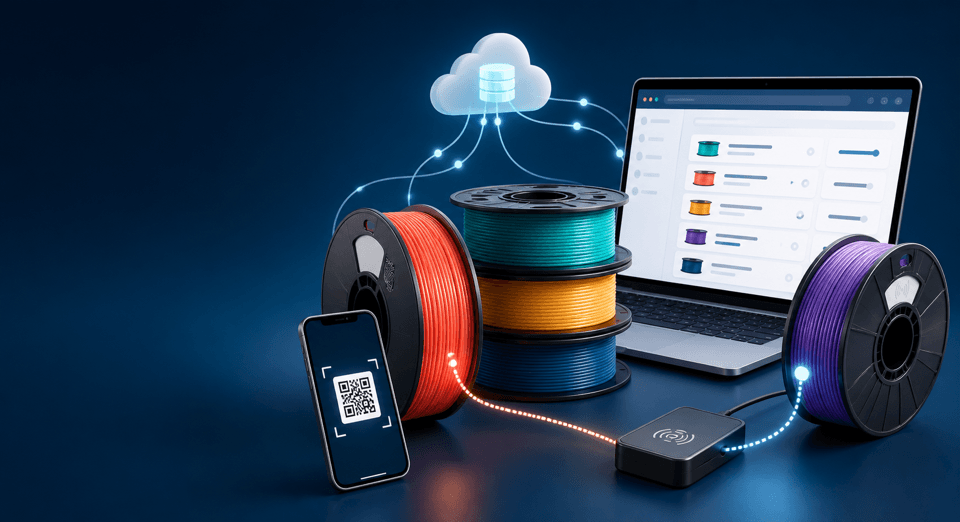
OpenFilament is an open, community-driven filament database that connects physical filament, calibration data, slicer profiles and RFID identification in one independent platform.

Calibrate once. Share what works. Use it everywhere.

Your filament should not belong to your slicer

A filament profile should describe the filament and the machine it is used on — not the computer on which it happened to be calibrated.

A properly calibrated profile may depend on:

  • filament manufacturer;
  • filament product and variant;
  • printer;
  • hotend;
  • nozzle diameter;
  • nozzle type;
  • build surface;
  • environmental conditions.

It should not depend on whether you are sitting behind PC A, PC B or a laptop.

OpenFilament creates a central source of truth for that information.

Instead of storing valuable calibration knowledge inside isolated slicer installations, profiles can be stored, compared, improved and reused.

Find the exact filament you are printing

Search by:

Manufacturer
Flashforge, Creality, Polymaker, SUNLU, JAYO, eSUN and more.

Material
PLA, PETG, ASA, ABS, TPU, PA-CF, PC and other materials.

Product and variant
Not merely “ASA”, but the exact commercial filament.

For example:

Flashforge → ASA → Burnt Titanium

Each filament can contain its manufacturer specifications, physical characteristics, colors, product identifiers, barcodes, drying information and community knowledge.

Manufacturer specifications and community measurements remain clearly separated.

Profiles for your actual printer configuration

A filament does not have one universally perfect profile.

OpenFilament therefore associates calibration data with the hardware on which it was measured.

For example:

Flashforge ASA Burnt Titanium
Creality K2 Plus
0.6 mm hardened steel nozzle

A profile can contain values such as:

  • nozzle temperature;
  • bed temperature;
  • chamber temperature;
  • flow ratio;
  • pressure advance;
  • maximum volumetric flow;
  • cooling;
  • retraction;
  • drying recommendations;
  • adhesion settings;
  • filament-specific limits.

Change printer or nozzle?

Select that configuration and see profiles measured under comparable conditions.

Community data instead of guesswork

OpenFilament is not intended to become another collection of unexplained profile files.

Calibration results should be measurable and traceable.

Users can submit actual calibration observations such as:

  • temperature towers;
  • flow-ratio tests;
  • pressure-advance tests;
  • maximum volumetric-flow tests;
  • retraction tests;
  • first-layer tests;
  • bridging tests;
  • dimensional tests.

The platform can combine multiple independent results into a community recommendation.

Suppose five users measure maximum volumetric flow on the same printer and nozzle:

29 mm³/s
30 mm³/s
31 mm³/s
31 mm³/s
45 mm³/s

The answer should not blindly become 33.2 mm³/s.

OpenFilament is designed to detect inconsistent measurements, preserve the raw results and calculate recommendations using transparent statistical rules.

You should always be able to see where a recommended value came from.

Download. Install. Print.

Finding a good profile should not end with manually copying twenty settings into your slicer.

OpenFilament is designed around slicer integrations.

The long-term goal is simple:

Find filament → select printer → choose profile → install

Initial integrations focus on:

Creality Print
OrcaSlicer

The architecture is designed to support additional slicers such as:

  • PrusaSlicer
  • Bambu Studio
  • SuperSlicer

OpenFilament uses its own vendor-independent profile format.

That means a Creality profile is not converted into an Orca profile and then converted again.

Instead:

OpenFilament Profile → Creality Print
or
OpenFilament Profile → OrcaSlicer

The filament data remains independent from every slicer.

Use the same profile on every computer

Calibrating filament should be a one-time job.

With OpenFilament, the calibrated profile belongs to your account and hardware configuration rather than one local slicer installation.

A future local companion application can safely synchronize profiles with your installed slicers.

That means:

Workshop PC
Desktop PC
Laptop

can all use the same filament knowledge.

If a profile is updated, OpenFilament can show exactly what changed before anything is replaced locally.

Personal modifications remain yours.
Community profiles remain separate.
Nothing should silently overwrite a carefully tuned local setup.

RFID without filament lock-in

Automatic filament detection is useful.

Being forced to buy a specific manufacturer's filament to use it is not.

OpenFilament treats RFID for what it should be:

a way to identify a physical spool.

The RFID tag does not need to become the database.

The database already knows the filament.

A tag only needs enough information to connect the physical spool to the correct identity.

For supported systems, OpenFilament can translate filament information into the RFID representation expected by that ecosystem.

Creality CFS support

Creality's CFS can automatically recognize RFID-equipped filament, but third-party filament support is unnecessarily limited.

OpenFilament is designed to bridge that gap.

A target workflow is:

  1. Search — Flashforge ASA Burnt Titanium
  2. Select — Creality K2 Plus, 0.6 mm nozzle
  3. Install — community calibrated slicer profile
  4. Write RFID — create a compatible CFS identification tag
  5. Insert spool — place the third-party spool into the CFS
  6. Print — associate the physical spool with the correct filament profile without recalibrating on every computer

The user gets the convenience of automatic filament identification without being forced into a proprietary filament catalogue.

Write RFID directly from the filament page

Where supported, a filament page can provide:

Write RFID

OpenFilament then prepares the correct vendor-specific representation.

A local hardware bridge communicates with a compatible RFID reader/writer.

The intended process is:

Detect tag → Read existing contents → Create backup → Generate payload → Write → Read tag again → Verify byte-for-byte → Success

A write operation is never considered successful until the resulting tag has been read back and verified.

Not limited to Creality

Creality CFS is an important first use case.

It is not the architecture.

OpenFilament separates three things:

Filament identity
What physical product is this?

Calibration knowledge
How does this filament perform on specific hardware?

Integration
How does a particular slicer or RFID ecosystem represent that information?

This separation allows new integrations to be added without redesigning the filament database.

Today that might mean Creality CFS.

Tomorrow it could mean another automatic material system, another slicer, a QR-based spool system, a custom NFC system, or an entirely open RFID standard.

An open identity for every spool

Vendor RFID is optional.

OpenFilament can also provide its own universal filament identity.

Every filament variant receives a stable unique identifier.

That identity can be represented as:

QR code
and eventually
OpenFilament RFID

The physical label can simply point to the canonical filament record.

The settings themselves remain in the database where they can be updated, versioned and validated.

A spool does not need hundreds of configuration parameters embedded permanently into a tag.

Scan a spool

Barcodes and QR codes can also be used to locate filament.

OpenFilament is designed to support:

  • EAN
  • UPC
  • GTIN
  • manufacturer SKU
  • manufacturer barcode
  • OpenFilament QR

Scan the spool and go directly to its filament page.

From there you can:

  • view manufacturer information;
  • find profiles;
  • select your printer;
  • install settings;
  • submit calibration results;
  • or program a supported RFID tag.

Your measurements remain visible

Community recommendations must never hide the underlying evidence.

Every calibration can retain information such as:

  • test method;
  • measured result;
  • selected safe operating value;
  • printer;
  • nozzle;
  • slicer version;
  • firmware version;
  • ambient temperature;
  • humidity;
  • filament drying state;
  • filament batch;
  • date;
  • notes;
  • optional test photographs.

This makes it possible to answer a much more useful question than:

“What setting does someone on the internet recommend?”

Instead:

“What have users with this exact filament, printer and nozzle actually measured?”

Improve existing profiles

Found a profile that is almost perfect?

Do not destroy it.

Fork it.

A community profile might recommend:

Maximum volumetric flow: 28 mm³/s

You discover your configuration reliably manages:

30 mm³/s

Your personal version can retain the relationship:

Based on Community Profile v4

with your modification clearly recorded.

If enough independent measurements support the same change, the community recommendation may eventually improve as well.

Every change has history

Profiles are versioned.

Published calibration data is not silently rewritten.

Changes create revisions.

That means users can see:

  • what changed;
  • who changed it;
  • which measurements were added;
  • which profile version they installed;
  • and why a newer recommendation exists.

If yesterday's profile worked perfectly, that knowledge does not disappear because somebody edits a number today.

Manufacturer data is not community data

If a manufacturer states:

240–260 °C

OpenFilament records that as a manufacturer specification.

If the community finds that a specific printer/nozzle combination performs best around:

255 °C

that is recorded separately as community calibration data.

Both are useful.
They are not the same thing.

OpenFilament is designed to preserve that distinction throughout the platform.

Open by design

The platform is intended to be independent of any single printer manufacturer.

Its canonical data model belongs above vendor ecosystems.

The goal is not to replace slicers.

The goal is not to replace printer firmware.

The goal is not to create another filament brand.

The goal is to create the missing open knowledge layer between:

the filament you buy
and
the machine that prints it.

Built for sharing

One person calibrating one spool helps one person.

Thousands of users repeatedly calibrating identical filament is wasted effort.

OpenFilament turns those isolated measurements into reusable knowledge.

A good calibration can become useful to anyone using comparable hardware.

A failed calibration is useful information too.

Community members can report issues such as:

  • poor bed adhesion;
  • stringing;
  • warping;
  • under-extrusion;
  • weak layer adhesion;
  • clogging;
  • bridging problems;
  • dimensional inaccuracies.

The database becomes more useful as evidence accumulates.

Open API

The filament database is designed to be usable outside the website as well.

A documented versioned API can allow developers to access:

  • manufacturers;
  • materials;
  • filament variants;
  • printer definitions;
  • calibration profiles;
  • community recommendations;
  • profile exports;
  • RFID mappings.

This allows other open-source projects to build on the same filament knowledge rather than creating another isolated database.

Read the API documentation

One source of truth

The fundamental architecture is deliberately simple:

Filament Database → Calibration Evidence → Recommended Profiles → Slicer Adapters → RFID Adapters → Your printer

The database describes the filament.

Calibration data describes how it behaves.

Slicer adapters translate the settings.

RFID adapters identify the physical spool.

No slicer and no printer manufacturer owns your filament library.

The goal

Imagine buying a new spool of third-party filament.

You scan it.

OpenFilament recognizes the exact product.

You select your printer and nozzle.

Twelve other users have already calibrated that combination.

You inspect their measurements.

You install the recommended profile.

You write a compatible RFID tag.

You place the spool in your material system.

Your printer recognizes it.

Your other computer already has the same profile.

You print.

No repeated calibration.
No manually copying settings.
No proprietary filament requirement.
No artificial lock-in.

That is what OpenFilament is intended to become.

Calibrate once. Improve together. Print anywhere.

Open filament data.
Open calibration knowledge.
Open integrations.
Your filament. Your profiles.

Catalog